MQTT
What you will find in this section:
MQTT
MQTT (Message Queuing Telemetry Transport) is a lightweight publish/subscribe protocol designed for efficient data exchange in IoT and automation environments.
The MQTT interface uses the same data structure as the REST API of the device and is available from firmware version 1.7.0. Via MQTT, data is provided to the broker and no write access is possible. This means that no device settings can be changed via this interface.
Topic Structure
The following data categories are availalble via MQTT:
- Device information
- Instantaneous values
- Meter readings
- Measurement control
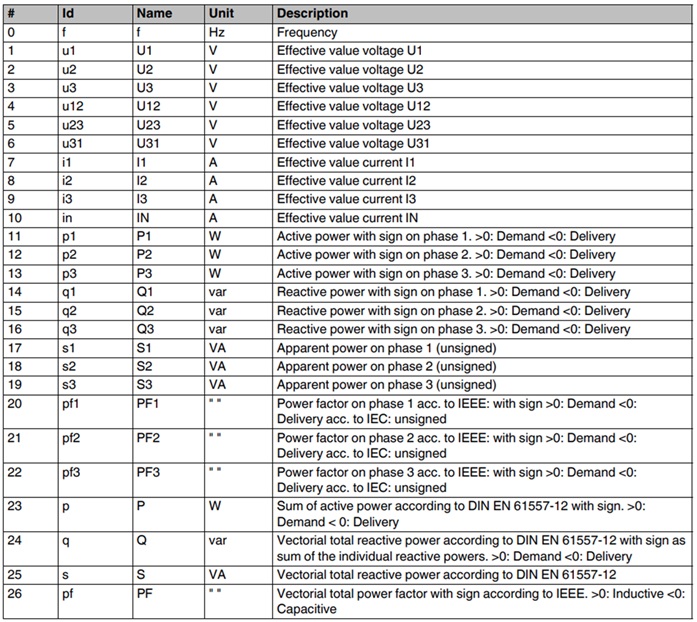
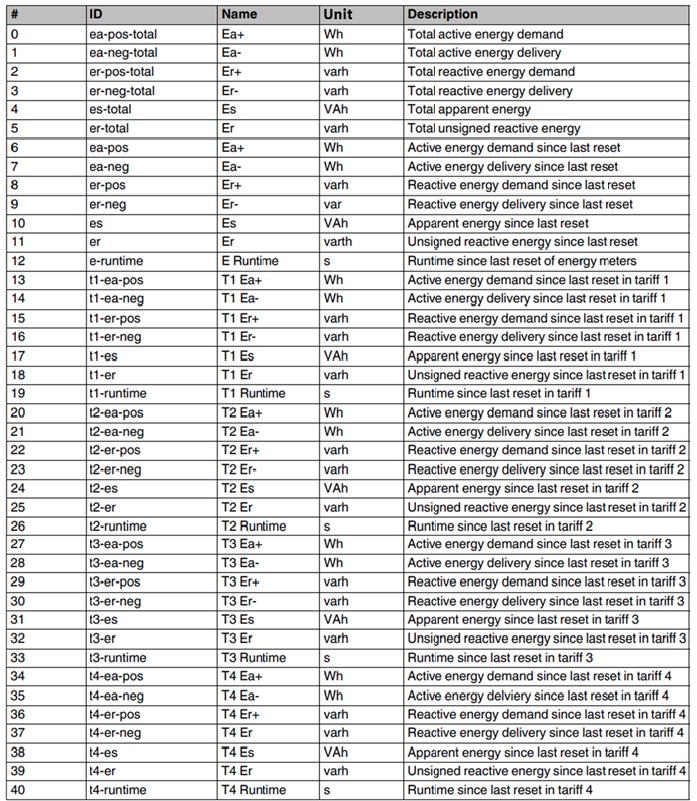
The individual categories contain the following data points:
Device information
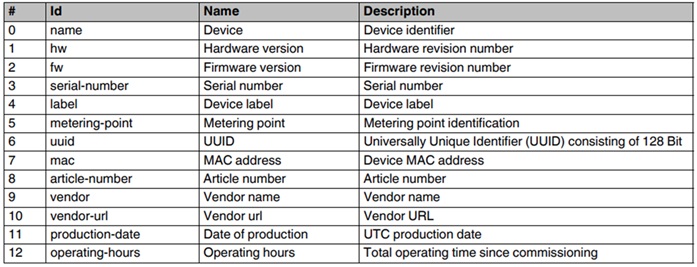
Instantaneous values
Meter readings
Measurement control

The predefined topic names are formed by chaining the following elements:
- “EMpro_” and the configured Client-ID
- Data category name
- Data point ID
Example - Topic (for frequency value, Client-ID = Test_device):
EMpro_Test_device / Instantaneous values / f
In addition to the listed properties (ID, name, (unit), description), the timestamp (UTC format) and the value are published for each data point.
Example - Published data point (for frequency value):
{
"id":"f",
"timestamp":"2025-10-28T21:05:55Z",
"name":"f",
"value":0.000,
"unit":"Hz",
"description":"Frequency“
}
Settings
MQTT settings are configured through the device’s web interface. By default MQTT communication is deactivated. A connection to a broker can only be configured in detail after clicking on "Publish enabled". The connection setup starts after the settings have been saved.
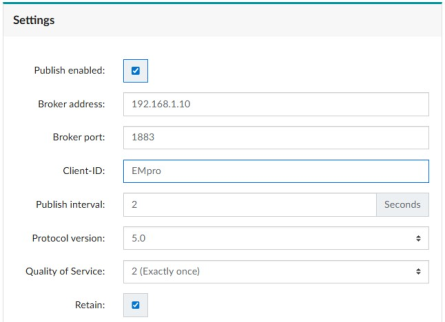
Broker Address: IP or hostname of the external MQTT broker
Broker Port: Default is 1883 (no TLS)
Client ID: Unique identifier for the device
Publish interval: Data refresh rate in seconds (1 – 600 s)
Protocol version: 3.1.1 / 5.0
Quality of service: Describes the guarantee level for message delivery (0 , 1 or 2)
Retain: If true, broker saves last published messages of device (relevant for new clients)
Enter correct credentials if broker authentication is required (and no anonymous login is planned)
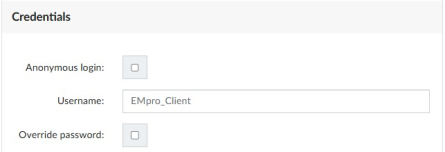
Username: Username - determined by the broker
Password: Password - determined by the broker (Input is enabled when “Override password” is activated)
Note: Once connected, the device saves the password for the broker and no new entry is necessary until credentials change.
Ensure the MQTT broker is reachable over the network. Firewall and Ports (Port 1883) must be open. Higher QoS levels increase network load.
Status
In the case of an established MQTT connection the connection status to the broker is shown in the Status area of the MQTT setting page.
 Connection established
 Connection interrupted
- The status light turns green immediately as soon as a connection to the broker has been established
- The status light turns red as soon as a failed data transmission is detected. The duration of the detection depends on the broker settings and can take some seconds.
A Keep Alive interval of 120 seconds is permanently set in EMpro for the MQTT connection. If the device does not send any data within this period to the broker, it sends a PINGREQ packet to keep the connection alive.